
Document Workflow That Doesn’t End in Email
Manage documents from creation through review and approval to publication, archiving, or sharing with employees.

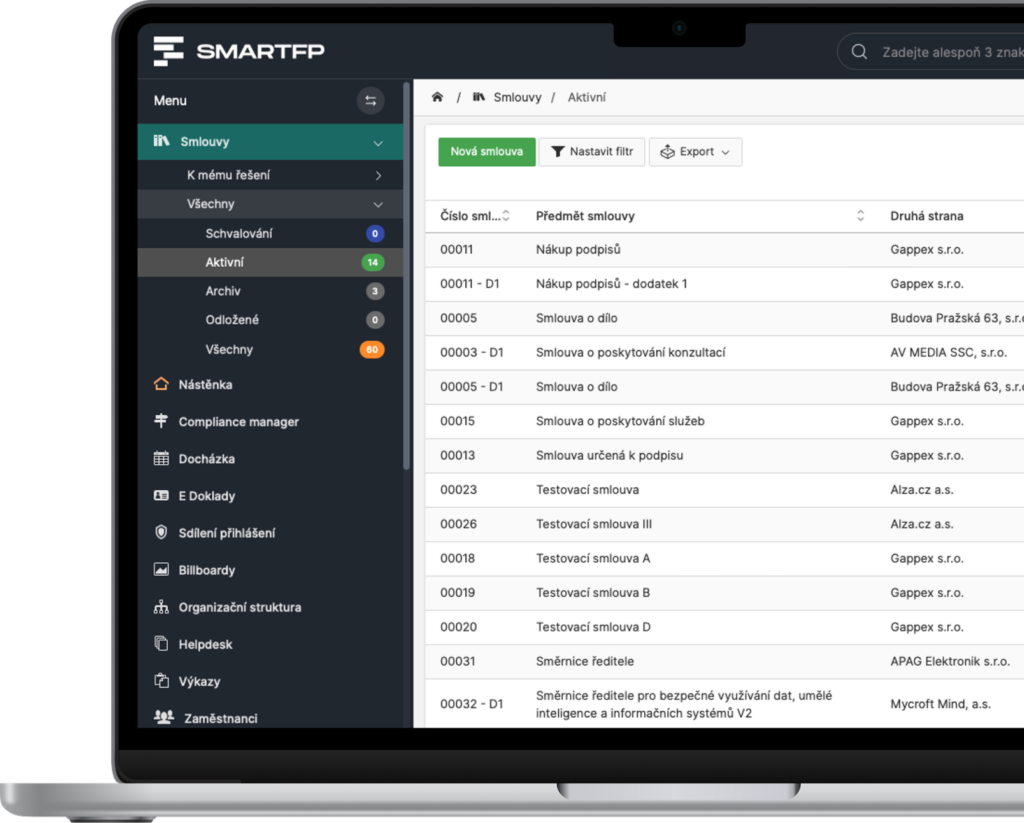
main functions
What the Document Workflow in SmartFP Offers You
Documents no longer need to be passed around via email, folders, and chat.
In SmartFP, every document has a clear status, an assigned person, a history, and the next step.
Document Registry
Store guidelines, methodologies, protocols, internal documents, and attachments all in one place.
Comments
Have selected individuals review the document before it is approved.
Document Approval
A document may go through an approval process depending on its type, department, or internal policies.
Publication of Documents
An approved document can be made available to specific users, teams, or the entire organization.
Introduction to the Document
The publication may be followed by a confirmation that the employees have reviewed the document.
History and Versions
A history of changes, comments, approvals, and previous versions is retained for the document.
Problems vs. Solutions
When documents are circulated via email, control is lost
Problems
The comments are scattered throughout the emails
No one knows which version of the document is the latest
It is not clear where the document was approved
Documents are stored in various locations
There is no record of who has reviewed the document
Sensitive documents are not restricted by permissions
How SmartFP solves it
Every document has a single location, status, and history
Feedback is provided directly within the system
Approval follows the configured workflow
Approved documents can be published in a controlled manner
The document may be followed by a confirmation of review
Access is governed by roles and permissions
A document is not just a file. It’s a process.
SmartFP Document Workflow is more than just a file repository. It allows you to manage the entire document workflow—from creation through review and approval to publication, archiving, and acknowledgment of receipt.
Creating a Document
Creating a record or uploading an internal document.
Approval
A controlled approval process in accordance with internal rules.
Publications
Making the approved document available to the appropriate users.
Comments
Involving selected individuals or departments in content review.
Introduction
Confirmation that employees have reviewed the document.
Import documents from
emails into the process
Try SmartFP for document workflow and eliminate the need to manually track versions, comments, approvals, and employee notifications.

How Document Workflow Works in Practice
Creating a Document
Upload the document to SmartFP or create it as a new record. It can be a guideline, a methodology, an internal document, a protocol, or any other company document.
Every document has a specific location, status, and person in charge.
Comments and Approval
Selected individuals review the document, and it then goes through the approval process. The workflow can be configured based on the document type, department, or internal rules.
Comments, versions, and approvals remain traceable.
Publications and Introductions
Once approved, the document can be published to selected users or groups. Publication may be followed by a process to confirm that the document has been reviewed.
Do you know who viewed, approved, or confirmed the document?
Who for?
Who is the document workflow in SmartFP intended for?
HR Department
For internal regulations, guidelines, onboarding documents, or acknowledgments of employee training.
internal guidelines
Employee Orientation
read receipt
controlled publication
Management
For managing responsibilities, approvals, and oversight of important documents.
approval
responsible persons
status overview
reports
Operations and Administration
For everyday documents, guidelines, protocols, and internal operating procedures.
minutes
methodologies
internal documents
workflow
Legal and Compliance Agenda
For documents that require traceability, authorization, and a clear history.
audit trail
controlled access
version history
traceable approval
Read our case study
See how SmartFP helps companies digitise their daily agenda in practice.

AAA AUTO has accelerated the resolution of IT requirements thanks
When the original ticketing system is no longer sufficient IT requirements were under control. The problem was that the system that…
Learn how to use SmartFP in minutes
You can customise the system to make it easy to use for everyone. Accountants, receptionists and bosses. On the computer and in the mobile app. Just a few details below. We will contact you and suggest a date for a demonstration, free of charge and without obligation.