Contract tracking systemwhere no deadline gets lost
Manage contracts from drafting through review, approval, and signing all the way to long-term record-keeping. SmartFP helps you keep all contracts, amendments, deadlines, authorizations, and history in one place.

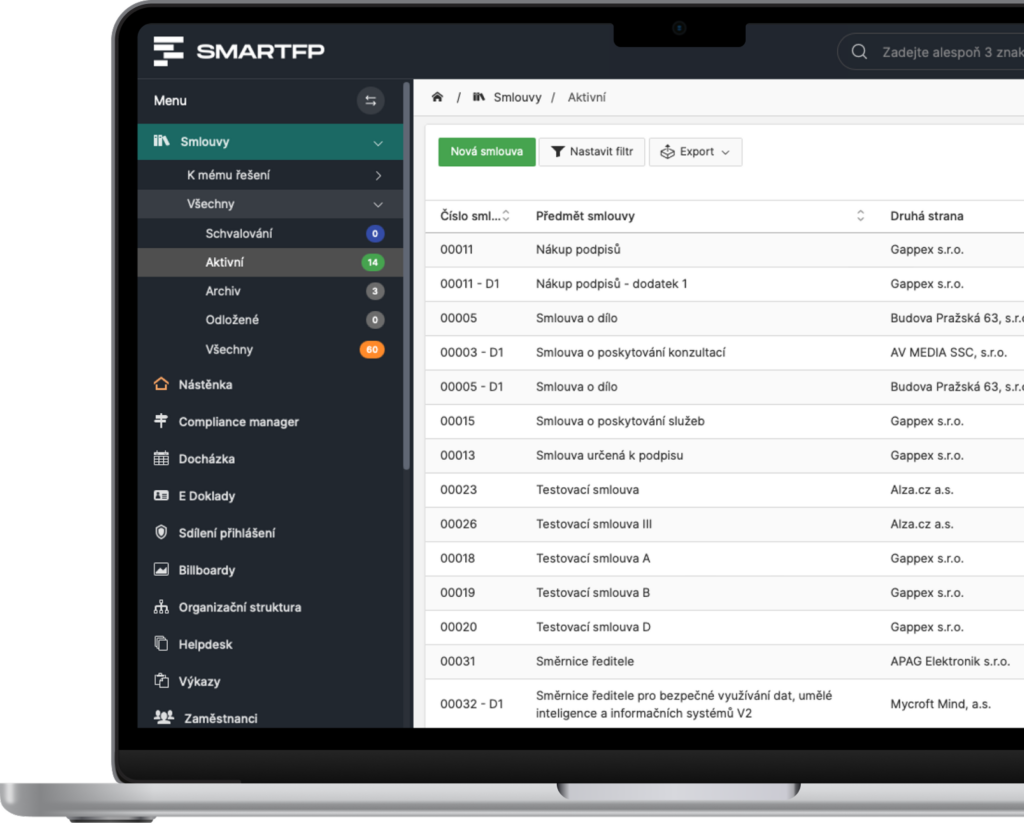
main functions
What Contract Tracking Offers You
From simply filing a contract to managing the entire contract process, including approval, signing, amendments, and tracking deadlines.
Contract Records
Store contracts, amendments, and related documents in one place.
Contract Generation
Create contracts using the templates provided by the client and fill in the necessary information.
Comments
Involve the legal, finance, sales, or other departments in reviewing the contract.
Contract Approval
Set approvers manually or based on predefined rules.
Electronic Signature
Once approved, the contract can be sent directly to the contracting parties for electronic signature.
Tracking Deadlines
SmartFP alerts you to expiration dates, notice periods, renewals, or reviews.
Problems vs. Solutions
When Contracts Live in Emails, Folders, and Binders
Problems
No one knows exactly where the latest version of the contract is
Comments Get Lost in Emails
There is no clear record of the contract’s approval
Deadlines, extensions, and reviews are tracked manually
Paper contracts are physically stored in a different location than their records
Sensitive contracts may be viewed by people who are not supposed to have access to them
How SmartFP solves it
Each contract has a location, history, and status
Both the review and approval processes take place directly within the system
The signed contract will be filed with the relevant record
The system monitors validity, notice periods, checks, and renewals
For paper contracts, the physical location can be recorded
Access to contracts is governed by the user’s permissions and role
Contracts under control
from design to archiving
SmartFP Contract Management is more than just a document repository. It allows you to manage the entire contract process—from drafting to feedback, approval, and signing, to tracking amendments and monitoring validity and important deadlines.
Draft Contract
Create a contract from a template or upload your own document.
Comments
Involving selected individuals or departments in reviewing the proposal.
Approval
A controlled approval process in accordance with internal rules.
Signature
The option for both internal and external parties to use electronic signatures.
Evidence
Active contract, amendments, deadlines, authorizations, and history.
Get an overview of your contract management with
Try SmartFP for contract management and eliminate the need to manually track deadlines, versions, approvals, and amendments.

How Contract Tracking Works in Practice
Establishment or Creation of a Contract
In SmartFP, you can easily register a contract, upload it as a file, create one from a template, or enter it as a paper contract, including information about where it is physically stored.
Each contract has a clear location, type, responsible person, and history.
Commenting and Approval
A draft contract can be sent to selected individuals or departments for feedback. After the feedback has been incorporated, the contract can go through the approval process according to the established workflow.
Comments, approvals, and responsibilities can be tracked in the system.
Signature and Active Record-Keeping
An approved contract can be sent for electronic signature. Once signed, the contract is saved back to SmartFP, and the system begins monitoring its validity, notice periods, renewals, and regular checks.
Once signed, the contract remains in the system, and SmartFP keeps track of important deadlines.
Who for?
Who is the contract tracking feature in SmartFP intended for?
Leadership and Management
An overview of important contracts, deadlines, responsibilities, and risks.
management contracts
access restrictions
Schedule Overview
reporting
Legal Department
Managed feedback, version control, approval, and handling of amendments.
comments
addenda
change history
approval process
Economics Department
An overview of contracts with financial implications, links to services, vendors, and payments.
supply contracts
Terms of Payment
financial parameters
Checks and Notifications
HR and Human Resources Management
Records of employment-related documents, amendments, and contracts pertaining to employees.
employment contracts
internal approvals
operational documents
audit trail
Read our case study
See how SmartFP helps companies digitise their daily agenda in practice.

AAA AUTO has accelerated the resolution of IT requirements thanks
When the original ticketing system is no longer sufficient IT requirements were under control. The problem was that the system that…
Learn how to use SmartFP in minutes
You can customise the system to make it easy to use for everyone. Accountants, receptionists and bosses. On the computer and in the mobile app. Just a few details below. We will contact you and suggest a date for a demonstration, free of charge and without obligation.