Manage company trips efficiently. And reduce errors in record-keeping
The SmartFP Logbook helps you keep clear records of business trips, automatically calculate distance and travel time, and prepare reports for fleet management.
Three Daily Challenges
From trip logging to easy-to-read reports
Where is the trip data?
Record the date, time, route, and purpose of every business trip in one place.
How long does the registration process take?
Let the system calculate the distance traveled and the travel time based on the data in the log.
How do I prepare the materials?
Keep your records available for review, editing, and preparing reports for your accountant.
main functions
Everything you need for clear tracking of business trips
From route entry through automatic calculations to record verification and reporting.
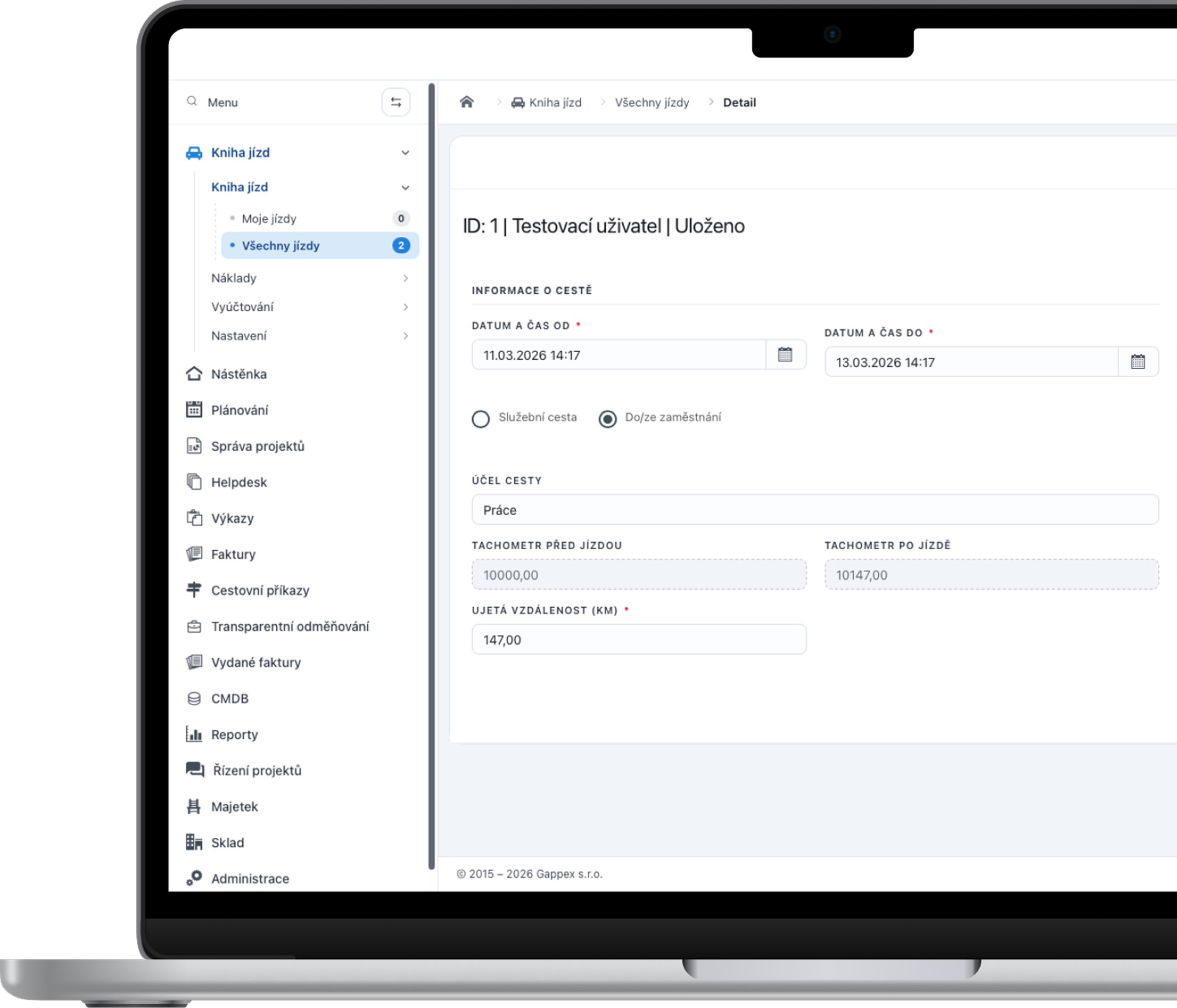
Record of a Company Trip
Enter the date, time, and other details about your trip.
Source and destination addresses
Keep track of where you came from and where you went.
Purpose of the trip
Enter the reason for the trip directly in the corresponding record.
Automatic Calculations
Get the distance traveled and the duration of the trip.
Overview and Edits
Review the records and fill in the necessary information.
Reports and Supporting Documents
Prepare reports for the accounting department and for auditing company vehicle use.
How the Logbook Works in Practice
Record your trip
When you return, enter the date, time, starting and destination addresses, and the purpose of your trip.
All the important information is in a single record.
Let the system do the math
SmartFP records the data and calculates the distance and duration of the trip.
You’ll reduce manual calculations and errors in record-keeping.
Work with a clear overview
Authorized users can view, edit, and generate reports.
You have the information you need for management and oversight right at your fingertips.
Benefits of SmartFP
What are the benefits for your company?
Drivers
Less paperwork after every trip.
Date, time, route, and purpose of the trip—all clearly displayed in a simple interface.
Easy Data Entry
Automatic Calculations
Overview of Records
Company Management
Overview of company trips.
Get access to data on completed trips for more efficient fleet management.
Records in One Place
Available Reports
Structured Data
Accountant
Documents without a time-consuming search.
Work with stored trip data and prepare reports for accounting and auditing purposes.
Searchable Records
Overview of Routes and Purposes
Accounting Documents
Fleet Managers
Easier record-keeping.
Review your recorded trips, verify the data, and edit it as needed.
Review of Trip Records
Edits and Additions to Data
Streamlined Record Management
No-obligation demo
Check out the Logbook in Practice
We’ll show you how to enter business trip details, perform automatic calculations, and generate clear reports—all within a single system.

Read our case study
See how SmartFP helps companies digitise their daily agenda in practice.

AAA AUTO has accelerated the resolution of IT requirements thanks
When the original ticketing system is no longer sufficient IT requirements were under control. The problem was that the system that…
Simplify Your Company Mileage Tracking
Show us how you keep your logbook today. We’ll show you how drivers can enter data and how managers and accountants work with it. Schedule a no-obligation demo.
FAQ
Your most common questions
Are you interested in entering trips, calculations, or working with reports? Check out the frequently asked questions about the SmartFP Logbook. If you need more details about the options for your company, please contact us.
What is the SmartFP Logbook?
An electronic module for systematically recording the routes and trips of company vehicles in a single system.
What information does the driver enter?
After the ride, the user enters the date, time, starting and destination addresses, the purpose of the trip, and other necessary information.
What does the system calculate automatically?
SmartFP calculates the distance traveled and the duration of the trip based on the data in the log.
Where are the records stored?
The data is automatically saved to a database, where it is organized in a clear and structured manner.
Who is authorized to access the records?
Authorized individuals, such as managers or accountants, have access to the information they need to do their jobs.
Can saved records be edited?
Yes. Authorized users can view, edit, and add to the stored data.
What are reports used for?
They provide the data needed for fleet management, accounting, and the verification of trip logs.
Is a trip recorded even if the driver doesn’t enter anything?
The procedure described here assumes that the driver enters the data after the trip. SmartFP then saves the data and performs the calculations.