Employee Records You Always Have at Your Fingertips
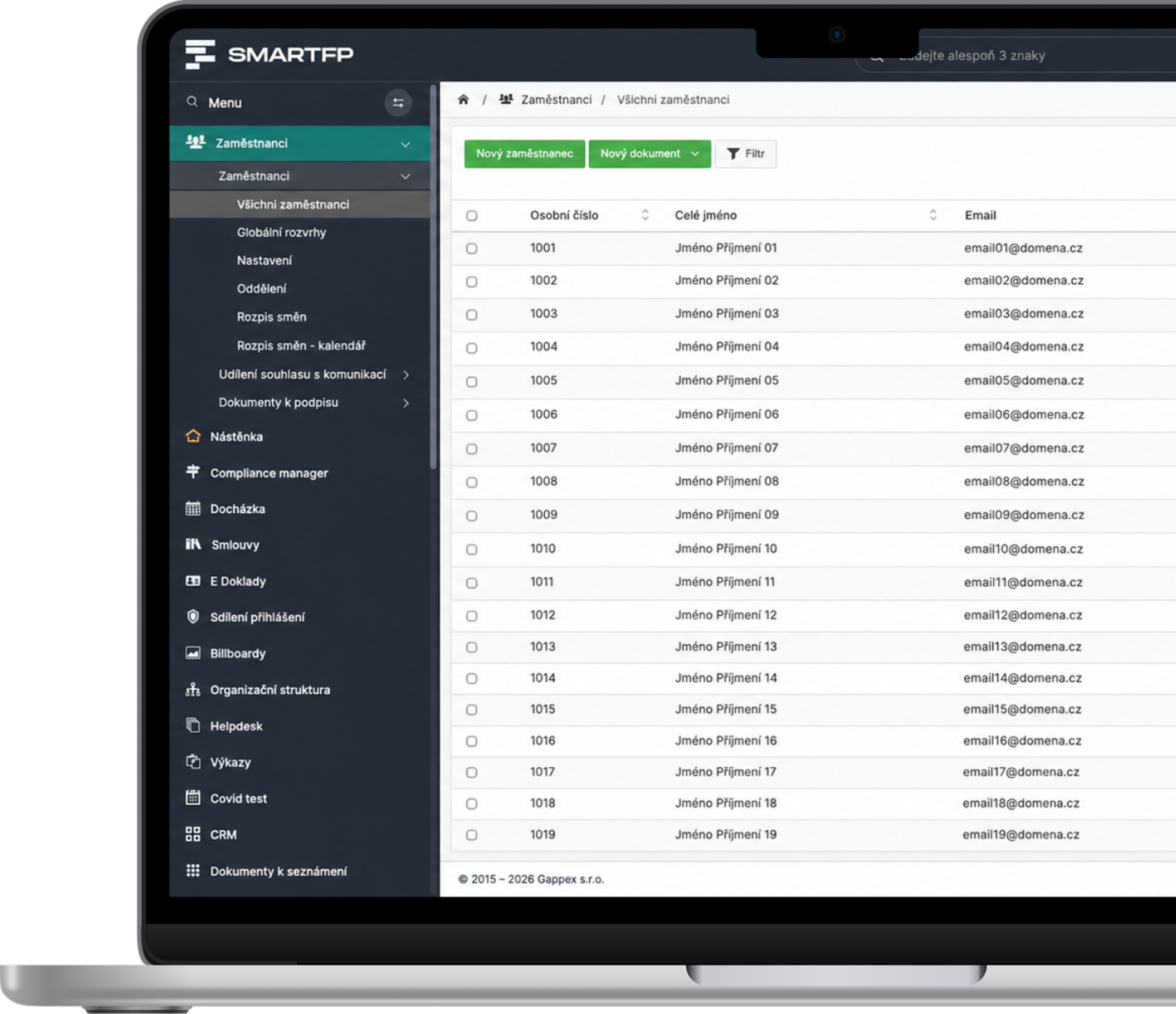
Complete employee data in one place—from contracts to employment arrangements to documents. No more spreadsheets or searching to figure out who has what and where.
main functions
What the records offer you
Complete Employee Profile
Personal information, job titles, employment statuses, and work history—all in one place.
Contracts and Documents
HP, DPP, DPČ, amendments—all linked to the record.
Employee Portal
People can view their own documents and data without having to ask HR.
Integration with Attendance Tracking
Attendance, absences, and leave linked to the attendance records.
Organisational structure
Overview of positions, supervisors, and team assignments.
Transparent Compensation
Guidelines on Salaries and Fair Compensation in Accordance with the Law.
Problems vs. Solutions
When You Don’t Have All Your People Data in One Place
Problems
The data is scattered across Excel files and binders
No one knows where the current contracts are
HR Wastes Time Searching for Documents
Employees are always asking questions
There is no overview of employment contracts and amendments
How SmartFP solves it
All employee data on a single card
Contracts and Amendments Always at Your Fingertips
Employees can find the documents themselves on the portal
A Clear Overview of Work Loads, Positions, and History
Integration with attendance tracking, vacation requests, and document access
Employee Records as a Single Source of Truth
SmartFP keeps all employee data in one place—from contracts to employment agreements to documents.
Employee Card
Contracts and Documents
Employment Contracts and Positions
Employee Portal
Keep your people data under control at
Try the Employee Records feature in SmartFP and keep your HR tasks in order.

How an IT Help Desk Works in Practice
Onboarding and Card Setup
A new employee is entered once—personal information, position, work schedule, and contract. Everything is on a single card; no need to copy and paste between spreadsheets.
You have all the information about the person right from the start.
Management in Progress
Changes in positions, amendments, new documents, and work schedules are recorded in the employee’s file. Employees can view their data in the portal, and attendance and vacation records are linked.
Every change has a clear history and clear accountability.
Overview and Output
You can access contracts, document reviews, and history at any time. When you’re done, everything is recorded and ready to go.
You have a complete overview of an employee’s entire tenure at the company.
Who for?
Who is the Employee Record feature in SmartFP intended for?
Staff
Your own documents and data are always at your fingertips.
employee portal
own documents
familiarization with documents
Team Leaders
An overview of the people, positions, and work schedules on your team.
organizational structure
Jobs and Positions
evaluation materials
HR and Human Resources Management
Complete data on people—no Excel spreadsheets or binders required.
employee card
Contracts and Amendments
change history
Management
Transparent data for management and compensation.
Overview of People
transparent compensation
decision-making information
Read our case study
See how SmartFP helps companies digitise their daily agenda in practice.

AAA AUTO has accelerated the resolution of IT requirements thanks
When the original ticketing system is no longer sufficient IT requirements were under control. The problem was that the system that…
Learn how to use SmartFP in minutes
You can customise the system to make it easy to use for everyone. Accountants, receptionists and bosses. On the computer and in the mobile app. Just a few details below. We will contact you and suggest a date for a demonstration, free of charge and without obligation.
FAQ
Your most common questions
Looking for answers to your questions or need help with our system? We’ve put together a list of frequently asked questions where you can find useful information and solutions to common problems. If anything is not clear to you? Send us a question.
What can the Employee Records module do?
It keeps all employee data in one place—personal information, job titles, work schedules, contracts, and documents. You can track an employee’s entire career, from hire to departure, without spreadsheets or file folders.
What types of employment arrangements does the module track?
Primary employment relationships and contracts—HP, DPP, and DPČ, including combinations thereof and their history. For each employee, you have an overview of their current and past classifications.
Can the records be linked to attendance and vacation time?
Yes. The module integrates with attendance, absences, and vacation time, so employee data is kept together across all modules.
Can the module manage employment contracts and amendments?
Contracts, amendments, and other documents are linked directly to the employee’s profile. You always know where to find the latest version, and nothing gets lost in emails.
Does the module support transparent compensation?
Yes. It helps comply with the Pay Transparency Directive—it provides an overview of compensation by position and employment status and manages access to sensitive data.
What is document review?
A feature that provides verifiable proof that an employee has reviewed a policy, contract, or other document. You have a record of who confirmed the document and when.