Asset management functions in SmartFP
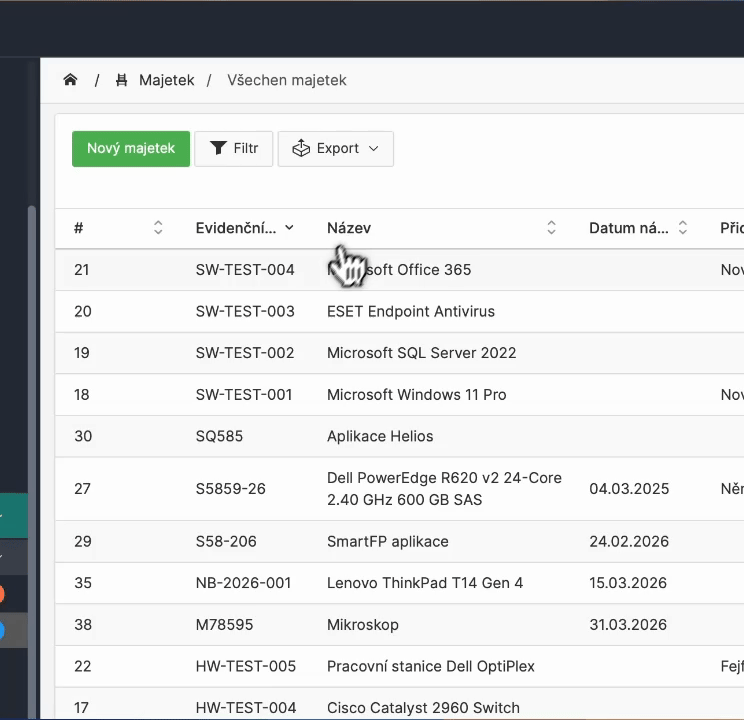
From asset records to allocations and transfers to inventories, audits and audit trails. All tied to a specific asset and traceable over time.

Requirements management
Manage IT requirements in one system
Get visibility into all requests, incidents and communications.
Speed up IT support and have clear control over what is being addressed.
Ticket system
All requirements clearly in one place
Categories and priorities
Sort requirements by importance
Assignment of the solver
Each ticket has a clear responsibility
Request status
Instant overview of the solution progress
Incident & change management
Incident and change management without chaos
Respond quickly to incidents and stay in control of changes in your IT environment.
Ensure system stability and smooth operation.
Incident management
All requirements clearly in one place
Change management
Controlled change management in systems
Escalation
Handing over more complex cases to higher support
Approval of changes
Clear process for approving changes
Automation and workflow
Automate request processing
Simplify the work of your IT team with rules and automation.
Reduce manual work and speed up solutions.
Workflow
Automatic process control
SLA
Monitoring of deadlines and reactions
Automatic assignment
Ticket goes straight to the correct solver
Rules and conditions
Automatic processing of requests
Communication and e-mail
Communication without lost information
All communication takes place directly at the request.
Everything is traceable and clear in one place.
Communication
Discussion of the request in one place
E-mail → ticket
Requests are generated automatically from email
Attachments
Files right next to the ticket
Notification
Notification of changes and reactions
Reporting and labour statements
Keep track of your IT team’s performance
Track how your team is performing and where problems are arising.
Make data-driven decisions.
Reporting
Overview of performance and statistics
SLA monitoring
Control of compliance with deadlines
Statements of work
Time records over requirements
Analyses
Identification of weak points
Integration and Extension
Connect the helpdesk to your systems
Connect the helpdesk to other tools in the company.
Ensure a smooth flow of information.
Integration
Connection to CRM and ERP
API
Interfacing with other systems
External cooperation
Involvement of suppliers
Mobile access
Helpdesk from anywhere
FAQ
Your most common questions
Looking for answers to your questions or need help with our system? We’ve put together a list of frequently asked questions where you can find useful information and solutions to common problems. If anything is not clear to you? Send us a question.
What type of assets can SmartFP record?
Hardware (laptops, mobile phones, servers), software, licenses, databases and other assets. Each asset has its own card with identifiers, classification, supplier, warranty, location and attachments.
How does the transfer of assets to an employee work?
SmartFP will enable the allocation of assets and the generation of a handover report. The employee can confirm (or reject) the acceptance and everything is stored in the asset history.
How is the asset inventory carried out?
You create an inventory by location, building, room or responsible person. The check is carried out via a registration number or QR code and the system evaluates the differences between the registered and actual status.
How does SmartFP help with NIS2 requirements?
NIS2 starts with an overview of your assets: what you have, who uses it, where it is and what the status is. SmartFP provides a central asset registry, traceability, inventory, revisions and history – the evidence that auditors and IT need to manage risk.
I’ll see who has a particular device and where it is located?
Yes. Assets can be assigned to an employee or an organizational unit and the location (location, building, room) can be recorded. Thanks to the filters you can quickly find out “who has what” and “what is where”.
Can the system transfer assets between employees?
Yes. It is possible to keep track of requests for transfer of assets, to have an overview of all transfers and the process of acceptance/approval. The history is traceable to the specific asset item.
Does SmartFP support QR codes?
Yes. You can print QR labels to identify assets and use them for inventory (or for measurement readings if you keep records).
Is an audit trail and change history available?
Yes. For each item you can see the history of changes and events (who modified what when), plus an overview of inventory and revisions. This is essential for internal control and auditing.