Data boxes under control. Automated. No chaos.
Connect SmartFP to ISDS and gain full control over the receipt, processing, and transmission of data messages—without manual work and without the risk of anything falling through the cracks.

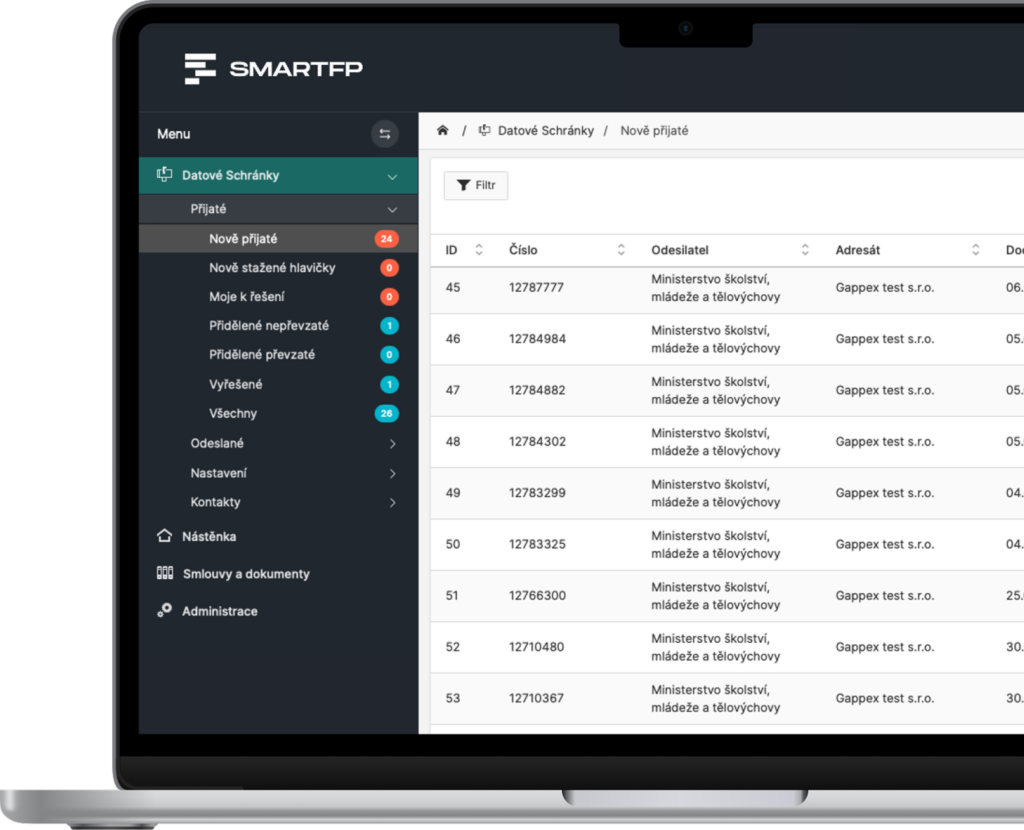
main functions
What the Data Boxes offers you
Everything you need to manage data messages—clearly organized, automated, and error-free.
Automatic Loading
Reports are downloaded from ISDS automatically without manual review
Message Workflow
Clearly defined statuses—from receipt to resolution—ensure a transparent processing workflow.
Assignment of the solver
Each report is assigned to a designated person who handles it and is responsible for it.
Monitoring Deadlines
The system tracks deadlines, generates reminders, and helps ensure compliance with statutory deadlines.
Complete Communication
History and Attachments in One Place
Reporting
Get an overview of the status of messages, team performance, and the progress of message processing.
Problems vs. Solutions
If you don’t have a system for data boxes, chaos ensues
Problems
Messages Get Lost in Emails
No one knows who is supposed to handle them
Deadlines are not monitored
Manual Message Forwarding
The overview and history are missing
How SmartFP solves it
Each report has an assignee
Complete communication history
Automatic Message Assignment
Clear Overview of Message Status
Tracking Deadlines and Urgent Matters
Data Boxes as a Managed Process
SmartFP transforms data boxes from chaos into a controlled workflow with clear rules, responsibilities, and oversight.
Message Reception
Processing
Sending
Notification
Take Control of Your Data Boxes
Try the Data Box module in SmartFP and eliminate errors, delays, and confusion in your communications with government agencies.

How Data Boxes Work in SmartFP
Adoption of the Report
The report is automatically retrieved from ISDS (or as a header) and added to the system.
No message will be lost
Processing and Shipping
The system assigns the message according to the rules (department / handler) and sends a notification.
Everyone knows what to do
Solution and Report
The investigator prepares the report, sends the response, and the system monitors the status and any errors.
full control over the process
Who for?
Who is the Data Box module intended for?
Companies that Communicate with Government Agencies
large volumes of messages
the need for oversight
legal liability
Accounting and Tax Firms
more mailboxes
high frequency of communication
Legal Department
Working with Deadlines
emphasis on precision
Medium-sized and Larger Companies
more users
workflow requirements
FAQ
Your most common questions
Looking for answers to your questions or need help with our system? We’ve put together a list of frequently asked questions where you can find useful information and solutions to common problems. If anything is not clear to you? Send us a question.
How does SmartFP communicate with data boxes (ISDS)?
SmartFP connects directly to the Data Box Information System (ISDS) via the official API. Communication is fully automated and takes place at regular intervals (e.g., every 10 minutes).
Is using data boxes secure?
Yes. Login credentials are stored securely, and communication takes place via the official ISDS API. In addition, the system monitors password expiration and alerts users to any potential issues.
Can we manage multiple data boxes at the same time?
Yes. SmartFP allows you to connect and manage multiple data boxes within a single system. Each one can have its own settings, access rights, and workflow.
What happens when a new data message arrives?
The system automatically retrieves it, assigns it the correct status, and, based on the rules, assigns it to a specific handler or department. At the same time, it sends a notification.
Can you set who can send or approve messages?
Yes. The module offers detailed permission settings (e.g., administrator, reader, reception, approval). Each user sees only what they are authorized to see.
What does “message headers” mode mean?
Header mode loads only basic information about the message (such as the subject), without the full content. This is useful when the message is not yet available or you do not want to open it just yet.
Does the system track deadlines and send reminders?
Yes. SmartFP automatically tracks:
- unread messages
- upcoming deadlines
- unread messages
- errors during transmission
and sends notifications to the appropriate personnel.
What if an error occurs while sending a message?
The system detects the error, updates the message status, and automatically sends a notification. This allows you to address the issue immediately