
A helpdesk that puts your requirements in order
Manage incidents, requests and changes in one system. Accelerate IT support and keep track of what’s actually happening in your company.
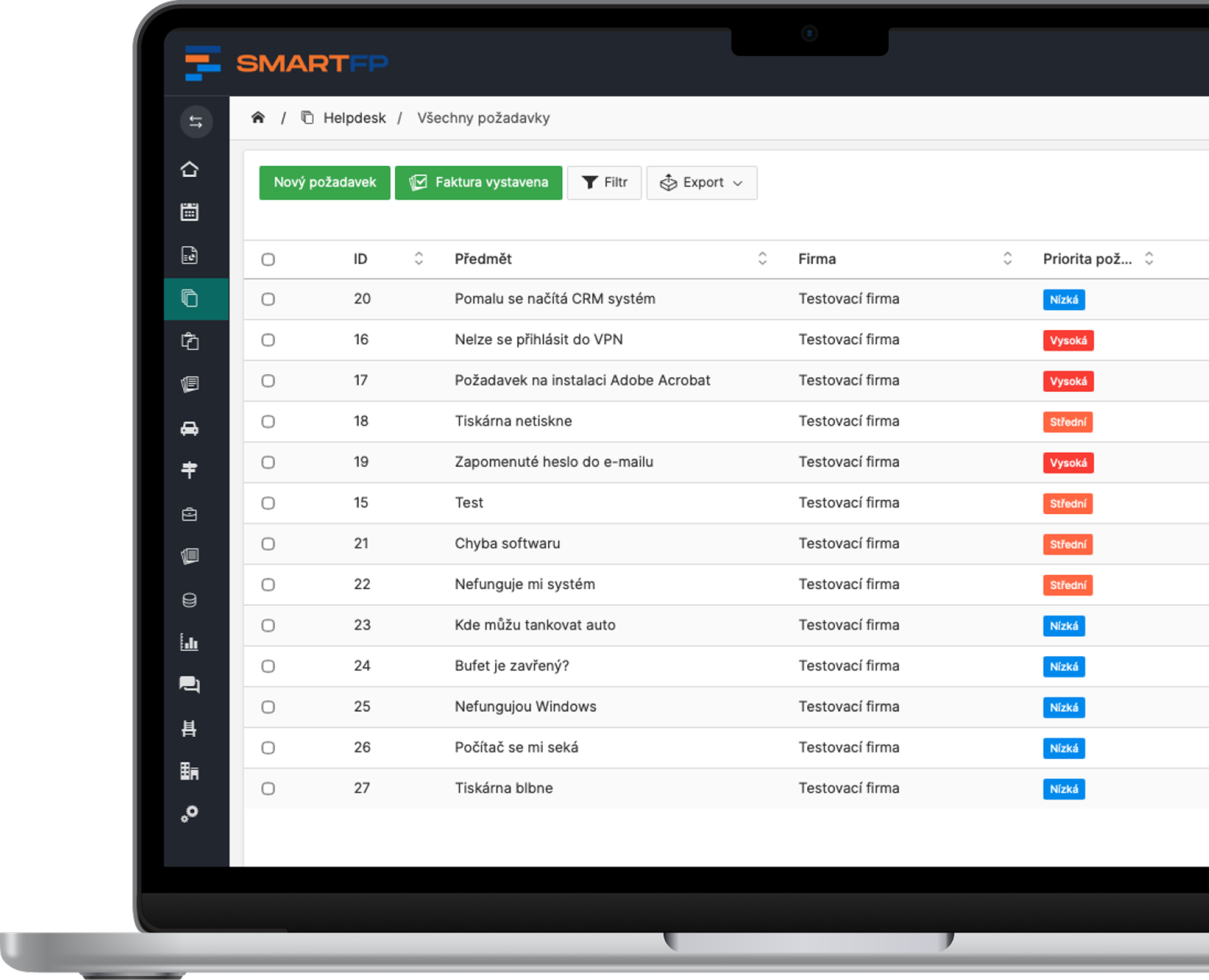
main functions
What the Help Desk Offers You
All the tools you need for effective IT support in one place.
Ticket system
All requirements clearly in one place
Automation
Workflow, rules and SLAs save time and speed up solutions.
Assigned solver
Each requirement has a clear responsibility.
SLA and escalation
Watching deadlines, priorities and automatic escalations.
Communication
All communication and attachments upon request.
Reporting
Overview of performance, SLAs, and IT team workload.
Problems vs. Solutions
When you don’t have a help desk, chaos ensues
Problems
Requests get lost in emails
Nobody knows who’s solving what
Incidents take too long to resolve
L1 / L2 communication is bound
Lack of overview of the status of requests
How SmartFP solves it
Every request has its own solver
Complete communication history
Automatic ticket assignment
Overview of requirements
Fast incident resolution
Helpdesk as a Comprehensive ITSM Solution
SmartFP Helpdesk is built on proven ITIL principles and covers key ITSM processes
, and Management Incident
Service
s Request
, and Management Issues
SLA
s Management
Simplify support and keep everything under control
Try the Helpdesk in SmartFP and take your support to the next level.

How the IT Helpdesk works in practice
Origin of the request
A request can be submitted simply via email, through a form, or via an internal request. Users don’t have to worry about where to turn—everything goes to one place.
The system ensures that no request gets lost right from the start.
Creating a ticket
The system automatically logs the request and converts it into a ticket.
Based on the rules, it assigns it to the appropriate handler and sets the priority.
Every request has a clear status, assigned responsibility, and history.
Solution and Report
Communication, collaboration between L1 and L2 support and the solution itself is ongoing.
After the request is closed, it is evaluated, saved to the history and included in reports.
You have an overview of the team’s progress and performance, including SLAs.
Who for?
Who is the IT Helpdesk in SmartFP for?
IT Support
Incident, request, and IT service management—all in one place.
Overview of All Tickets
fast incident resolution
L1 / L2 cooperation / suppliers
Operations and Facilities
Service requests, repairs, and internal tasks—all without the chaos.
Fault Reporting
maintenance management
supplier coordination
Staff
Easily enter your requests without having to figure out where to type them.
email or form
quick response
status overview
Management
Performance monitoring, SLAs, and an overview of company activities.
reports and analyses
SLA audit
process optimization
Read our case study
See how SmartFP helps companies digitise their daily agenda in practice.

AAA AUTO has accelerated the resolution of IT requirements thanks
When the original ticketing system is no longer sufficient IT requirements were under control. The problem was that the system that…
Learn how to use SmartFP in minutes
You can customise the system to make it easy to use for everyone. Accountants, receptionists and bosses. On the computer and in the mobile app. Just a few details below. We will contact you and suggest a date for a demonstration, free of charge and without obligation.
FAQ
Your most common questions
Looking for answers to your questions or need help with our system? We’ve put together a list of frequently asked questions where you can find useful information and solutions to common problems. If anything is not clear to you? Send us a question.
What is a Help Desk?
The help desk is a system for tracking and resolving requests, incidents, and communication within the company. It helps ensure that no request is overlooked and that every request is assigned to a specific person to handle it.
What is the difference between a Help Desk and a Service Desk?
The help desk is primarily used to handle requests and incidents.
The Service Desk is a broader concept that encompasses IT service management (ITSM), change management, SLAs, and other processes.
Is the Help Desk only for the IT department?
No. The help desk can be used across the entire company—for IT, HR, operations, facilities, or administration. It handles all types of internal requests.
How do requests enter the system?
Requests can be submitted via email, through a form, or via an internal request. The system automatically converts them into tickets.
Who is ITSM suitable for?
For companies that want to maintain control over their IT services, improve their processes, and enhance the quality of their support.
Will the Help Desk help speed up the resolution of requests?
Yes. Thanks to visibility, automation, and SLAs, both response times and the resolution process itself are accelerated.
What does ITSM stand for?
ITSM (IT Service Management) is an approach to managing IT services within a company. It focuses on the effective provision of support, as well as incident management, change management, and service quality management.
Does SmartFP support ITIL?
Yes. SmartFP supports key ITIL principles, such as incident management, change management, SLAs, and workflow management.